

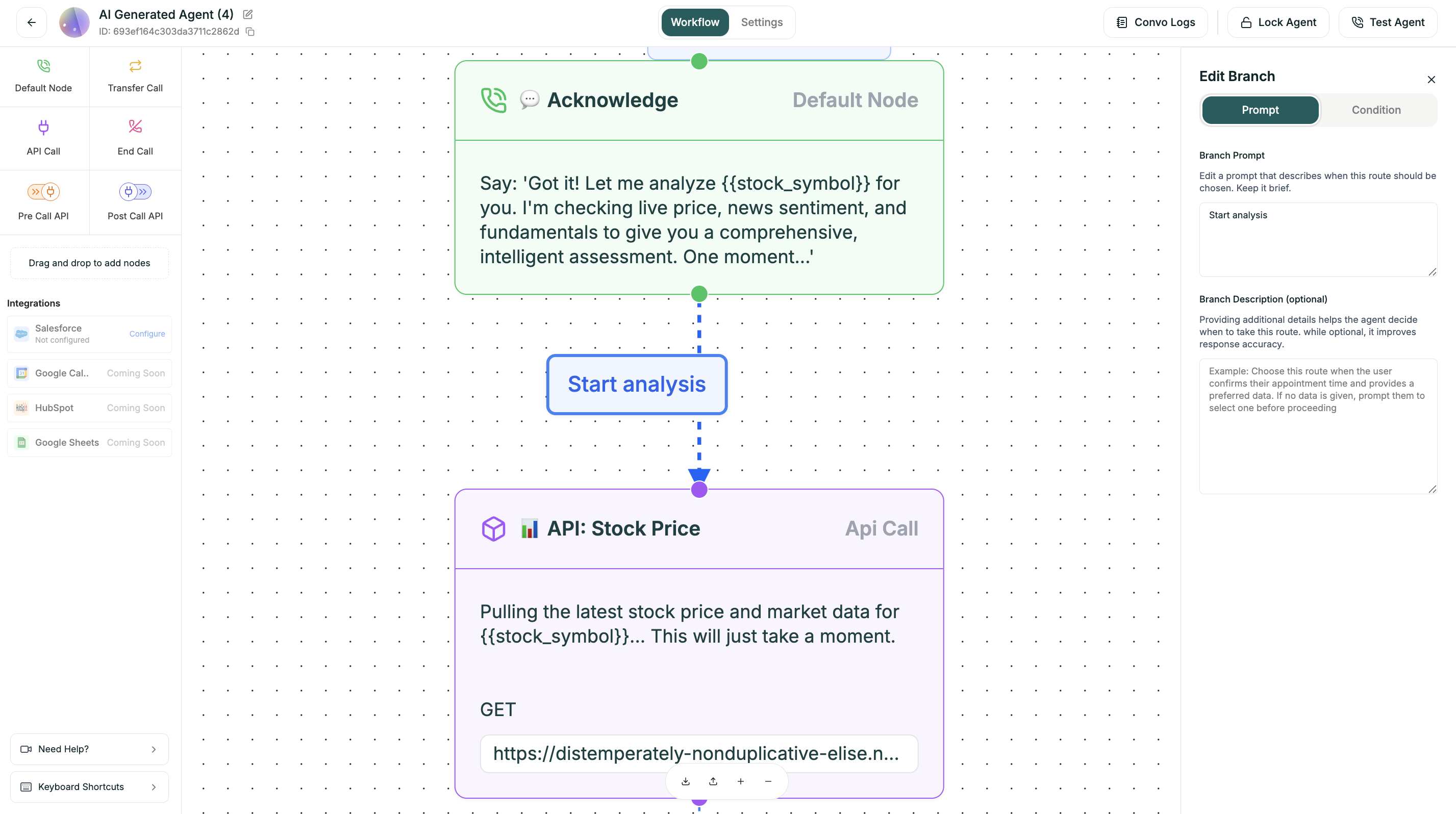
How Branching Works
Configuring Branches
Click any Default node, then click Branching to configure output paths.
Adding a Branch
- Click the Default node you want to branch from
- Click Branching in the configuration panel
- Click + Add Branch
- Configure the condition
- Connect to the target node
Branch Fields
| Field | Description |
|---|---|
| Label | Name shown on the canvas (e.g., “Wants Billing Help”) |
| Condition | What triggers this path (natural language or variable-based) |
| Target Node | Where the conversation goes when this condition matches |
Condition Types
- Natural Language
- Variable-Based
- Compound (AND/OR)
- Default/Fallback
Write conditions in plain English. The AI interprets caller intent.Examples:
| Condition | Matches When Caller Says |
|---|---|
| ”User confirms" | "Yes”, “Yeah”, “That’s right”, “Correct" |
| "User declines" | "No”, “Nope”, “Not really”, “I don’t think so" |
| "User asks about billing" | "I have a billing question”, “About my invoice" |
| "User wants to speak to a person" | "Can I talk to someone?”, “Get me a human" |
| "User is frustrated” | Angry tone, complaints, escalation requests |
| ”Anything else” | Fallback — catches everything not matched above |
Branch Order Matters
Conditions are evaluated top to bottom. The first matching condition wins. Correct Order:{{budget}} >= 50000→ Enterprise Path{{budget}} >= 10000→ Professional Path{{budget}} >= 1000→ Starter Path- Anything else → Self-Serve Resources
{{budget}} >= 1000← This catches everything above $1k{{budget}} >= 10000← Never reached{{budget}} >= 50000← Never reached
Real-World Examples
Support Routing
Lead Qualification
Confirmation Flow
API Response Routing
Best Practices
Always include a fallback
Always include a fallback
No matter how many conditions you define, something unexpected will happen.Your fallback should:
- Acknowledge the response
- Re-ask the question differently
- Offer options to clarify
Keep conditions mutually exclusive
Keep conditions mutually exclusive
Avoid overlapping conditions that could both match.
When conditions overlap, the first one wins — which may not be what you want.
| Overlapping (Bad) | Exclusive (Good) |
|---|---|
| “support” AND “technical support" | "billing” OR “technical” OR “other” |
>10 AND >50 | 10-50 AND >50 |
Test every branch
Test every branch
It’s easy to forget a branch while testing. Be systematic:
- List all possible paths
- Test each one deliberately
- Try edge cases (silence, gibberish, topic changes)
- Review in Conversation Logs
Limit branch depth
Limit branch depth
Too many nested branches become impossible to manage.If your flow is getting too deep:
- Can you combine some branches?
- Should some paths be separate flows?
- Is Single Prompt better for this use case?
Use clear branch labels
Use clear branch labels
Labels appear on the canvas — make them meaningful.
| Bad Labels | Good Labels |
|---|---|
| ”Option 1" | "Wants Billing Help" |
| "Path A" | "Budget > $10k" |
| "Yes" | "Confirmed Appointment" |
| "Branch 2" | "Frustrated Customer” |
Complex Patterns
Loop Back (Retry)
For scenarios where you need to re-ask:Parallel Paths That Merge
Different paths can lead to the same destination:Guard Rails
Add safety branches for edge cases:Debugging Branches
When branches don’t work as expected:Next
Variables
Dynamic data for conditions and prompts
Test Your Agent
Validate your branches work correctly